Workbook Support
#NAME? Error
The formulas in the pricing / volatility sheets are driven by VBA Modules. For modules to work your Excel needs to have Macros enabled.
If you load the spreadsheet and #NAME appears as the output in the cells it means that Macros are not enabled. See instructions below on how to enable Macros for your version of Excel.
Excel 97 - 2000
- Go to Tools/Macro/Security
- Change the setting to Medium
- Close and reopen the workbook
- It will ask you if you want to enable Macros, click Yes
Excel 2003
- Go to Tools/Options
- Click on the Security tab
- Go to Macro Security
- Change the setting to Medium
- Close and reopen the workbook
- It will ask you if you want to enable Macros, click Yes
Excel 2007
First, make sure that you can see the Developer tab.
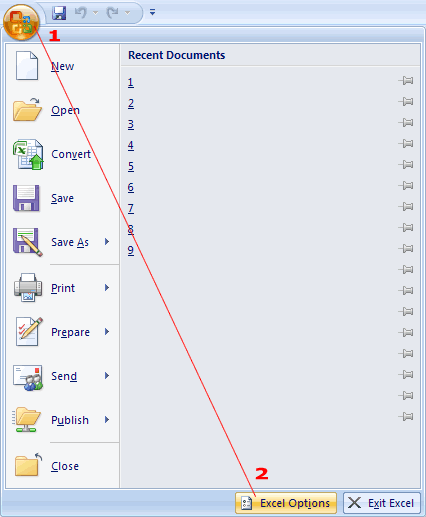
If there is no Developer tab, click on the Office icon to the top left of the application and choose Excel Options, which is located at the bottom right of the popup.
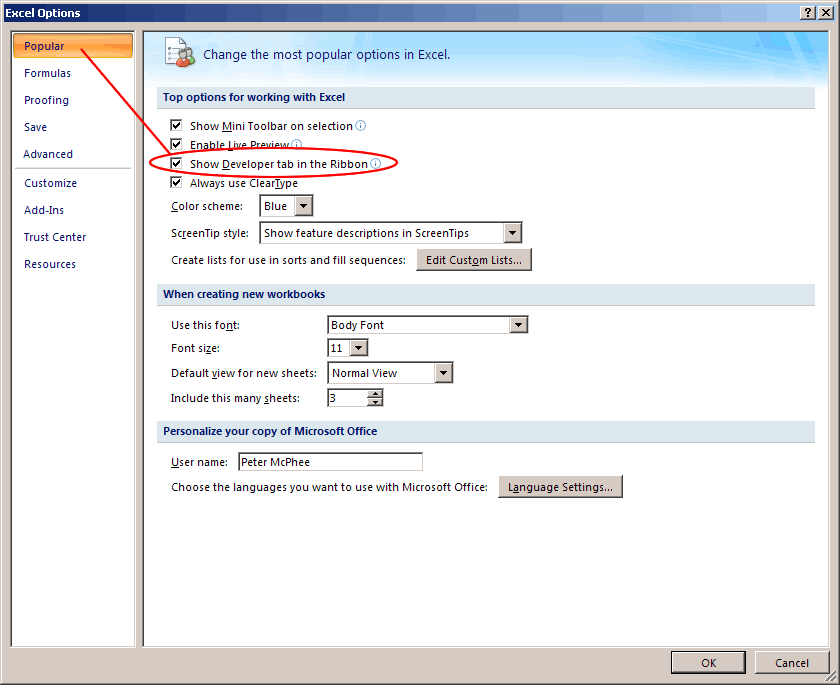
Now click on Popular at the top left. Check the box titled "Show developer tab in the ribbon".
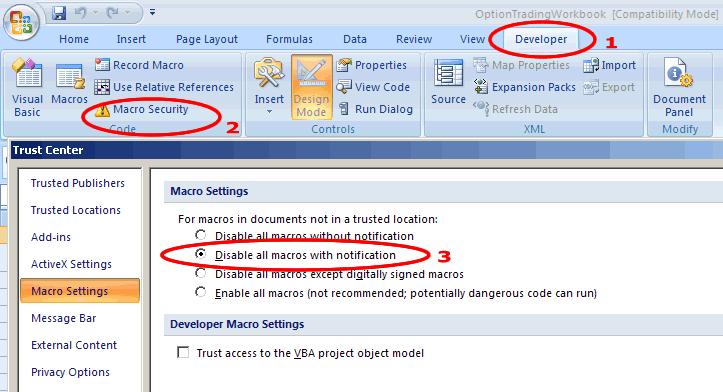
Now, click on the Developer tab.
Click on Macro Security.
Select "Disable all macros with notification" and press ok.
Close and reopen spreadsheet.
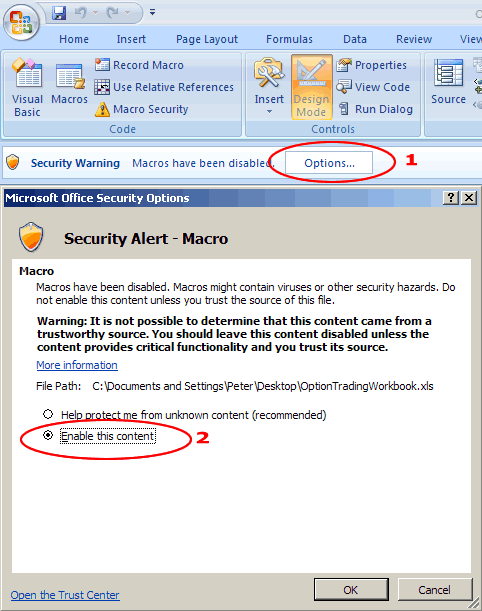
Now you should see a Security Warning appear in the toolbar that reads "Macros have been disabled". Click on the options button.
Select "Enable this content" and press ok.
If you have any more trouble feel free to contact me.
18 Comments
Mostar November 28th, 2014 at 3:09am
Hello Peter
I believe I solve the problem. Modify all functions by adding
If Time<=0 Then
EXIT FUNCTION
End If
There is other issue regarding libreoffice and openoffice.
It is not possible to run a user defined function, which is stored in a library except the Standard libraries. So I fixed it also.
If you want I can email you working spreadsheet in libreoffice/openoffice format so that you can add it to your site.
You welcome to email me (email removed)
Mostar
Moster November 28th, 2014 at 12:45am
Hello Peter,
Regarding my previous post. I found the cause. If "Expiry Date" past meaning
"DTE in Years" negative then it hang.
For example
Function dOne(UnderlyingPrice, ExercisePrice, Time, Interest, Volatility, Dividend)
dOne = (Log(UnderlyingPrice / ExercisePrice) + (Interest - Dividend + 0.5 * Volatility ^ 2) * Time) / (Volatility * (Sqr(Time)))
Give the error.
Mostar November 28th, 2014 at 12:20am
Hello,
> When you receive the error message, does the program jump into the code editor?
Its hang, if I click OK on the error message it pop-up immediately again. The only way out is to kill the process :-(
> It sounds like one of the functions doesn't exist in libreoffice.
I don't think so because it's not happen immediately, every thing work for few minutes and then it happen.
I try on Linux Libreoffice V4.2, V4.4 and on Windows XP old Openoffice 3.2 all with the same problem.
I have several sheet type base on your original one, and it happen in all of them.
Thanks
Peter November 16th, 2014 at 10:34pm
Hi Mostar,
Mmm, no, I've not used libreoffice - I built the spreadsheet to support Excel only. It sounds like one of the functions doesn't exist in libreoffice. When you receive the error message, does the program jump into the code editor? Just wondering if it takes you to the function by way of highlight to show you where the problem is?
Mostar November 13th, 2014 at 11:56pm
Hi,
Recently I migrate from excel to libreoffice calc spreadsheet. From time to time the spreadsheet hang on the following error:
"BASIC runtime error. '5' invalid procedure call"
The only way out is stopping the process.
I try to look at the VB functions but have no clue whith can cause this error and how to fix it.
Do you have any idea?
Thanks
Peter April 30th, 2014 at 5:55pm
Yes, in Excel 2013 there is a new function called GAMMA, which conflicts with the function I created. I've sent you via email a modified version, which contains the change and will update one on the download page the same way.
I changed the function to read OptionGamma instead of Gamma.
Peter April 28th, 2014 at 7:03am
Hi Michael,
Thanks for brining this to my attention - let me check this out tomorrow and come to you here. I might need to just modify the function name and release a new spreadsheet.
Michael April 28th, 2014 at 2:55am
In Excel 2013, the function GAMMA and your Gamma function conflict. How do I make Excel know that I want to use your Gamma function not the built-in GAMMA function?
thanks,
Abhishek October 11th, 2013 at 8:29am
Its inspiring the effort you have made to put together all the content in you site to be freely available to the public. Very educational and helpful.
Thank you.
Ty Khim November 29th, 2012 at 10:11pm
Great help, thanks so much
Add a Comment