Workbook Support
#NAME? Error
The formulas in the pricing / volatility sheets are driven by VBA Modules. For modules to work your Excel needs to have Macros enabled.
If you load the spreadsheet and #NAME appears as the output in the cells it means that Macros are not enabled. See instructions below on how to enable Macros for your version of Excel.
Excel 97 - 2000
- Go to Tools/Macro/Security
- Change the setting to Medium
- Close and reopen the workbook
- It will ask you if you want to enable Macros, click Yes
Excel 2003
- Go to Tools/Options
- Click on the Security tab
- Go to Macro Security
- Change the setting to Medium
- Close and reopen the workbook
- It will ask you if you want to enable Macros, click Yes
Excel 2007
First, make sure that you can see the Developer tab.
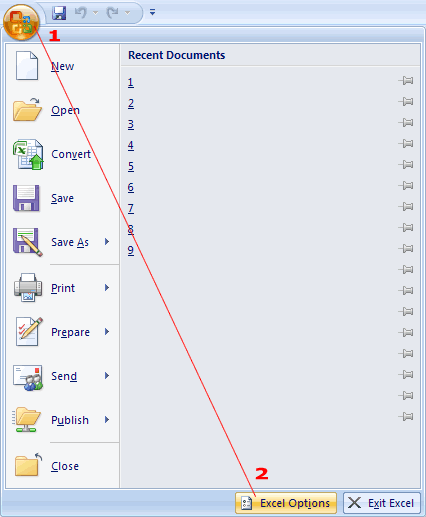
If there is no Developer tab, click on the Office icon to the top left of the application and choose Excel Options, which is located at the bottom right of the popup.
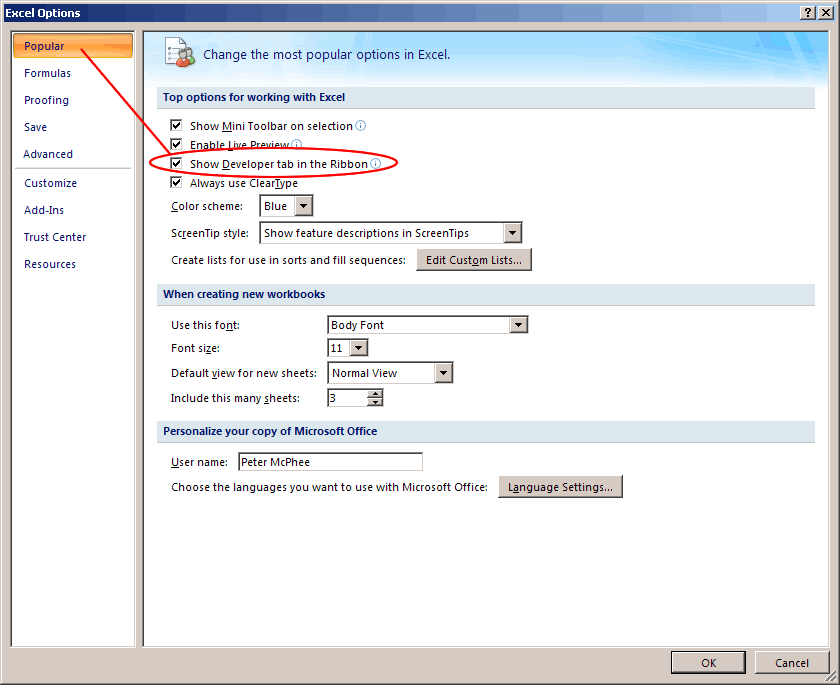
Now click on Popular at the top left. Check the box titled "Show developer tab in the ribbon".
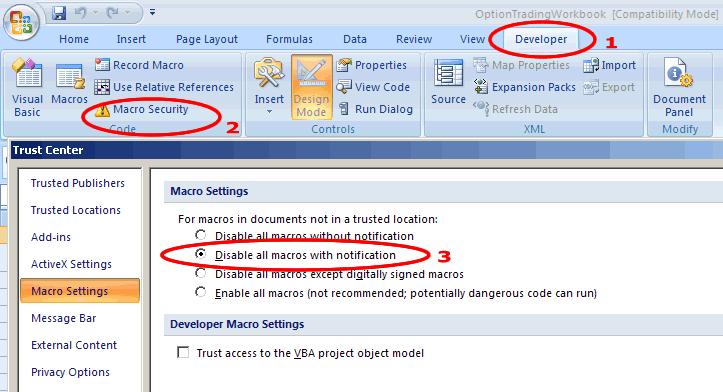
Now, click on the Developer tab.
Click on Macro Security.
Select "Disable all macros with notification" and press ok.
Close and reopen spreadsheet.
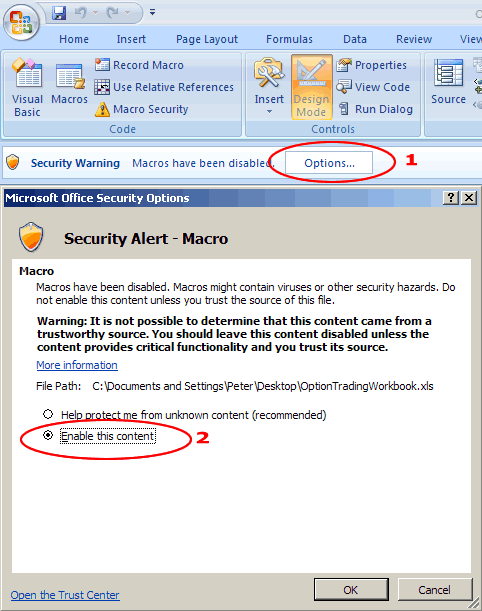
Now you should see a Security Warning appear in the toolbar that reads "Macros have been disabled". Click on the options button.
Select "Enable this content" and press ok.
If you have any more trouble feel free to contact me.
18 Comments
Learner October 2nd, 2012 at 4:44am
Thanks a lot for your hard work.
Rupesh Shukla September 12th, 2012 at 1:52am
for LOG function in Excel use:
Log(value,base value)
by default base value=2.7182818
use LOG((underlyingprice / exercise price)2.7182818
)
for LOG function in VBA
no need to use base value:
Peter October 20th, 2011 at 5:18am
Hi Gopal, don't worry about the calculated premium if you're using a stock leg. Just enter "stock" or "s" and use the stock price as the strike price.
Gopal October 19th, 2011 at 4:00pm
How do I add stock to one of the legs (e.g. delta /gamma neutral strategy) ? I tried putting an "s" but the calculated premium number seems strange ?
thanks
gopal
Waheed September 10th, 2011 at 4:13am
fantstic--Thank you
Peter July 27th, 2011 at 5:59am
That's right - so if you're using Excel formulas you will need to specify the natural logarithm LN i.e. LN(underlyingprice / exercise price)
vishnu July 27th, 2011 at 4:34am
The log in Functions result different than if log taken in excell cells, e.g
in VBA
log(underlyingprice / exercise price=8.5369958
while in excel cells
LOG(underlyingprice / exercise price)=-0.040617851
Lucio Miranda March 2nd, 2011 at 5:12am
Thank you for the free options study software.
Add a Comment